The Problem
Makers who use laser cutters, CNC routers, vinyl cutters, and 3D printers accumulate thousands of design files across their machines. SVGs, DXFs, STLs, LightBurn projects, G-code — scattered across folders with no good way to find what they need.
The core pain point wasn’t “I can’t see my files.” It was “I can’t find my files.”
That insight — discovered during community validation before writing a single line of code — shaped the entire product.
What MakerVault Does
Find any design file in seconds. Tag it. Open it. Done.
Auto-Indexing & File Watching
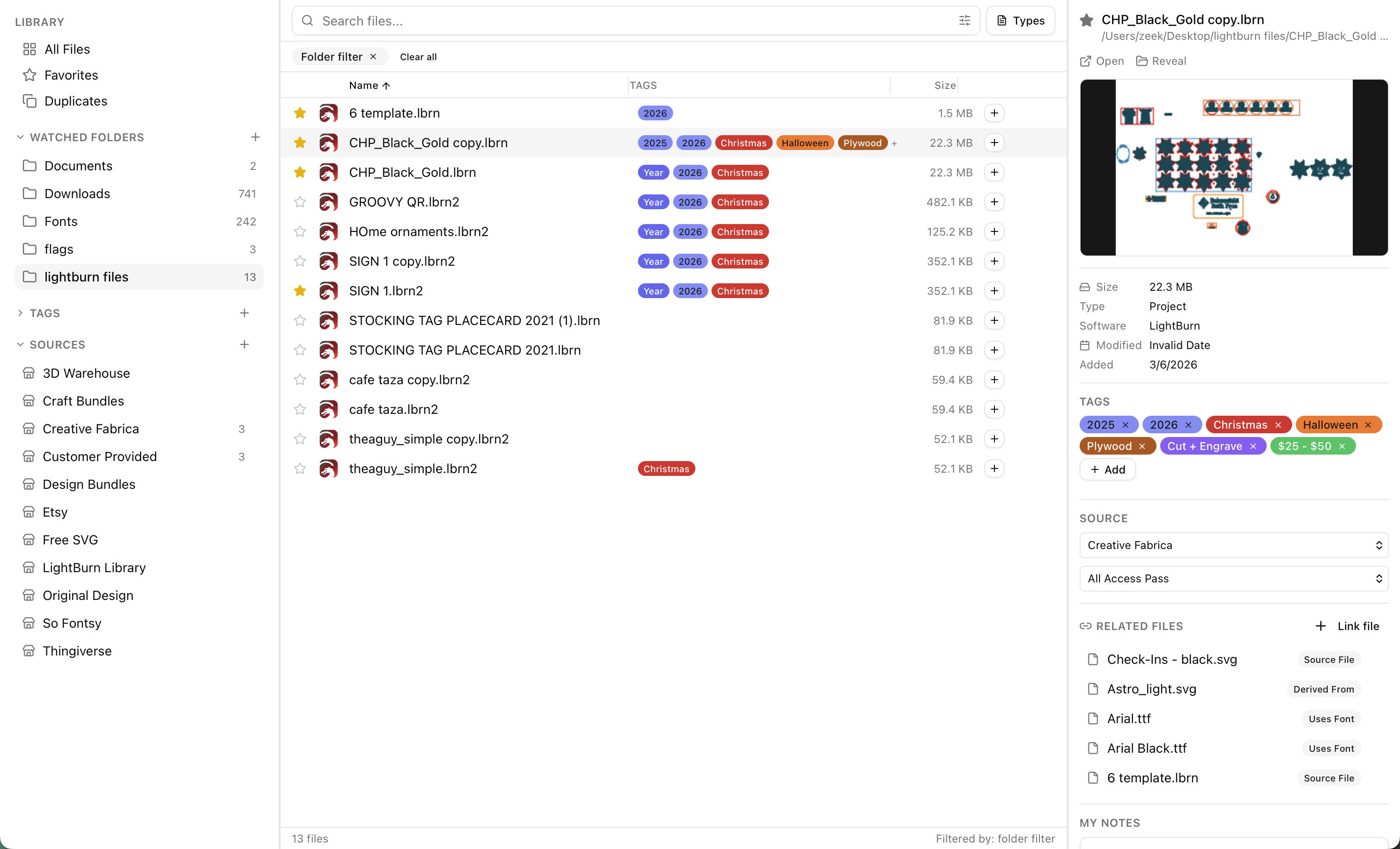
Point MakerVault at your folders and it auto-indexes 25+ file types: SVG, DXF, STL, LightBurn (.lbrn2), G-code, AI, EPS, PDF, and more. New files are detected automatically through file watching.
Instant Full-Text Search
Search returns results in under 30ms across 50,000+ files. But it doesn’t just search file names — it searches inside files. Find a project by the text it contains, the cut settings it uses, or the fonts it references.
LightBurn Deep Integration
The killer feature. MakerVault reads inside .lbrn2 files and extracts:
- Cut settings — speed, power, number of passes
- Text elements — every text string in the design
- Font names — which fonts are used
- Layer names — organizational structure
Search for “Helvetica” and find every LightBurn file using that font. Search for “speed 300” and find every file with that cut setting. No other tool does this.
Hierarchical Tagging
Organize files with up to 3 levels of nested tags. Color-coded badges make visual scanning instant.
Spacebar Quick Preview
Like Finder’s Quick Look — hit spacebar to preview any file without opening its native application.
Duplicate Detection
BLAKE3 hashing identifies duplicate files across all watched folders, helping reclaim disk space.
Source Tracking
Tag where files came from — Etsy, Design Bundles, your own designs — and filter by source later.
The Build: 72 Hours, 49 Commits
MakerVault was built in 72 hours (March 5–8, 2026) using Claude Code and a methodology I call the 48-Hour Product Playbook — heavy upfront planning so execution is pure velocity.
The Numbers
| Metric | Value |
|---|---|
| Total elapsed time | 72 hours |
| Commits | 49 |
| Lines of code added | 18,550 |
| Files created | 235 |
| Unit tests | 47 |
| Planning docs written | 1,487 lines |
| Refactors needed | 0 structural (2 cosmetic file splits) |
How It Happened
Day 1 (4 commits): Foundation — cloned a Tauri starter template, added database schema, file type registry, and Rust module scaffold. Phase 0 took 37 minutes.
Day 2 (33 commits): All core features — scanning, tagging, search, preview, file actions, licensing, file watching, onboarding, and 37 unit tests. One commit every 45 minutes for 24 hours straight.
Day 3 (5 commits): Polish — duplicate detection, app icons, auto-updater.
Day 4 (7 commits): Release hardening — code signing, notarization, final bug fixes.
By 5 AM on Day 2 (6 hours in), the app had scanning, tagging, search, preview, and file actions. The remaining 66 hours were polish, licensing, and release prep.
Why It Worked
The planning-to-code ratio was 1:12 — every line of planning generated 12 lines of shipped code. Key decisions that enabled this:
-
Pivot before code: The original concept was a visual thumbnail grid (“Lightroom for laser files”). Community validation revealed the verb was “find” not “see.” The entire architecture pivoted from visual browser → search-first organizer — in conversation, not in code. Zero commits were reverted.
-
File Type Registry: A single 414-line Rust file serves as the source of truth for all 25+ file types. Adding a new format = 1 entry that works everywhere.
-
Parallel execution: 5 Claude Code agents worked simultaneously (Rust backend, frontend, test writer, quality gate, plan tracker) because the implementation plan was specific enough to parallelize.
Technical Architecture
- Desktop Framework: Tauri v2 (native webview, ~5MB app size)
- Frontend: React with TypeScript
- Backend: Rust
- Database: SQLite with FTS5 full-text search indexes
- Hashing: BLAKE3 for duplicate detection
- Licensing: LemonSqueezy integration with offline activation
- Platform: macOS (v1.0), Windows planned for v1.1
Design Principles
- Local-first — All data lives in SQLite on your machine. Nothing in the cloud.
- Search-first — Every feature optimizes for finding files fast.
- Offline-capable — Works without internet after activation.
Business Model
- $59 one-time purchase (no subscription)
- 7-day free trial with offline license validation
- Payment: LemonSqueezy
Roadmap
- v1.1: Visual grid view with thumbnails, Windows support
- v1.2: Machine profiles, collections, batch rename
- v2.0: AI auto-tagging (on-device vision model), 3D preview for STL/OBJ/3MF